Results
Results tab
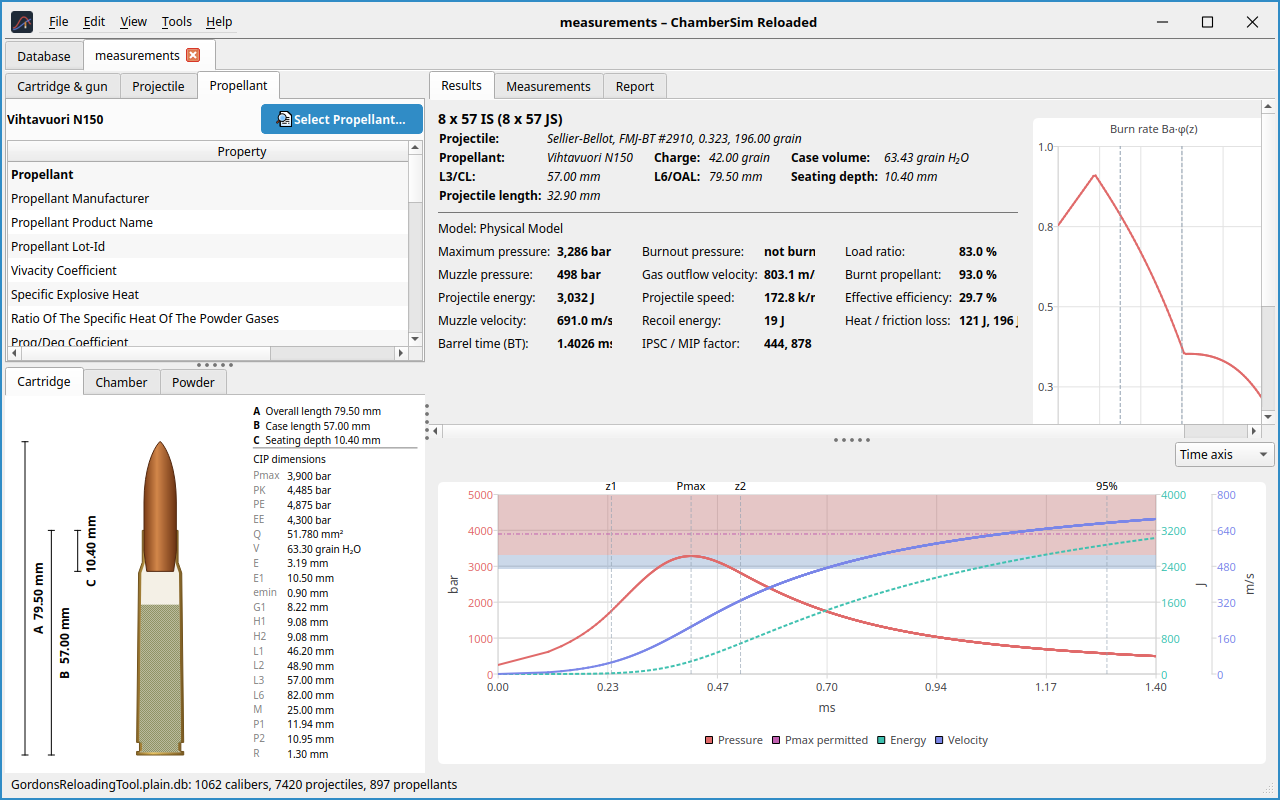
The Results tab shows a summary of the load and the key values: maximum pressure, muzzle pressure, projectile energy, muzzle velocity, barrel time, burnout pressure, gas outflow velocity, projectile speed (revolutions per minute), recoil energy, load ratio, the fraction of burnt powder, the effective efficiency and the heat and friction loss. The model in use is named above the values.
Warnings appear in colored banners: Above the permitted maximum pressure, Charge too high (the charge does not fit into the case behind the bullet) and Invalid input (the simulation cannot run with these values). Two orange notices concern the powder: No physical burn values and Powder values differ from the database (see section 6.3).
Chart
The big chart shows pressure, energy and velocity as curves. A drop-down menu switches the horizontal axis between time and position. Vertical lines mark the transitions of the powder burn (z1, z2), the position of the maximum pressure, burnout and 95 % of the muzzle velocity. The colored bands show the permitted maximum pressure. Move the mouse over the chart to read the values at that point.
Burn-rate chart
The smaller chart shows the burn rate \(B_a\cdot\varphi(z)\) over the burnt fraction.
Reference overlay
File → Overlay reference result… (Ctrl+R) draws a saved result (a JSON file, for example from a run of the original program) as dashed curves over the chart of the shown load, for comparison. Clear reference overlay removes it.
Load development ladder
With a ladder, the program simulates several charges at once. Set the number of steps and the charge difference in the load’s ladder fields; up to ten steps are possible. The selected charge is the maximum, the further steps go down from there. A table (charge, maximum pressure, velocity, energy and load ratio) and a row of tabs above the chart show the steps; click one to display its curve.
Choosing the solver model
In File → Settings → Solver you select the model:
Physical Model
(default) A time-integrated model with flame spread, engraving,
friction, air, heat loss and spin. It is fitted to published load data
of the powder manufacturers.
Published
The GRT equations with empirical constants.
GRT Original
Calibrated against reference runs of the original program.
The model in use is shown in the results. The three models give different numbers; they are not exchangeable.
Original GRT files.
With Always use GRT Original for original GRT files (*.grtload) a load
whose file is a .grtload is always calculated with GRT Original and
the burn values in the file, whatever model is selected. Its results are
then close to those Gordon’s Reloading Tool shows for the same file (the
results line says GRT Original (original GRT file, …)). Once the load is
saved as a .csrload, it uses the selected model again.